


Introduction
Tax return file karna hai but process dekh ke darr lag raha hai? You’re not alone! Every year millions of Indians struggle with ITR filing online because forms complicated lagte hain and process confusing ho jata hai.
But here’s the good news – ITR filing online is actually much simpler than you think. With the new e-filing portal, you can complete your entire tax return in just 30-45 minutes from your home. No CA charges, no paperwork hassle, no standing in queues!
In this guide, I’ll show you exactly how to do ITR filing online step-by-step. Whether you’re a first-timer or just want to refresh your knowledge, this article will make the entire process crystal clear. Let’s turn that tax filing stress into a simple weekend task!
Table of Contents
What is ITR Filing Online and Why You Should Do It
ITR filing online means submitting your Income Tax Return digitally through the government’s official e-filing portal (incometaxindia.gov.in). Think of it as telling the government about your yearly income, the tax you’ve already paid, and whether you owe more money or deserve a refund.
Why is ITR Filing Important?
Many people think “meri salary kam hai, ITR nahi bharni chahiye” – but that’s a mistake! Here’s why ITR filing online matters:
Legal Reasons:
- If your annual income exceeds ₹2.5 lakh (₹3 lakh for senior citizens), filing is mandatory by law
- Avoid penalties up to ₹5,000 for late filing
- Stay compliant with Income Tax Department
Practical Benefits:
- Get Your Money Back: Agar extra TDS cut hua hai, refund claim kar sakte ho
- Loan Approvals: Banks ask for 2-3 years of ITR for home loans, car loans, business loans
- Visa Processing: Most countries require ITR proof for tourist/business visas
- Income Proof: Freelancers, self-employed professionals ko ITR hi unka income proof hai
- Financial Credibility: Good ITR history builds trust with lenders and financial institutions
- Carry Forward Losses: Business loss ko future years mein adjust kar sakte ho
Real Example: Rohan, a software engineer earning ₹6 lakh annually, had ₹24,000 TDS deducted. After filing his ITR with actual deductions (80C, 80D), his tax liability was only ₹12,000. He got ₹12,000 refund in his bank account within 45 days!
Key Deadline You Must Know
The last date for ITR filing online for FY 2025-26 (Assessment Year 2026-27) is July 31, 2026. If you miss this:
- Penalty of ₹5,000 (₹1,000 if income is below ₹5 lakh)
- Loss of ability to carry forward certain losses
- Additional interest charges under Section 234A
Pro Tip: Don’t wait until July 31st! File early (April-May) to avoid server crashes and last-minute panic.
Who Must File ITR Online in 2026?
Not everyone needs to file ITR, but you definitely should if:
Mandatory Filing (You MUST file):
✅ Your total income exceeds:
✅ You want to claim income tax refund
✅ You have deposited more than ₹1 crore in your bank accounts during the year
✅ You spent more than ₹2 lakh on foreign travel
✅ Your electricity bill exceeded ₹1 lakh in any month
✅ You own assets located outside India
✅ You have signing authority in any foreign account
✅ You run a business or professional practice (any amount of profit/loss)
Materials: ₹2.5 lakh (for individuals below 60 years) ₹3 lakh (for senior citizens 60-80 years) ₹5 lakh (for super senior citizens above 80 years)
Voluntary Filing (Recommended even if not mandatory):
- Create official income proof for future loan applications
- Build financial credibility
- Track your financial health year-over-year
- Establish a clean tax record
Example: Priya is a freelance graphic designer earning ₹4.5 lakh annually. Even though she’s close to the exemption limit, filing ITR helps her show income proof to clients and builds credibility for future business loans.
Which ITR Form Should You Use for Filing Online?
This is where most people get confused! Choosing the wrong ITR form can lead to rejection of your return. Let me simplify this:
ITR-1 (SAHAJ) – For Most Salaried People
Use ITR-1 if:
- You’re a salaried individual or pensioner
- Total income up to ₹50 lakh
- Income from one house property
- Income from salary, pension, interest, and family pension only
- You’re a resident individual
Can’t use ITR-1 if:
- You have capital gains (sold property, shares, mutual funds)
- You’re a director in a company
- Income from business/profession
- Agricultural income above ₹5,000
- Foreign assets or income
Who should use: About 70% of salaried Indians can file using ITR-1 SAHAJ form.
ITR-2 – For Capital Gains and Multiple Properties
Use ITR-2 if:
- You earned capital gains (sold shares, property, gold)
- You have more than one house property
- You’re a director in a company
- You have foreign assets or foreign income
- Income exceeds ₹50 lakh from salary and house property
ITR-3 – For Business Owners and Professionals
Use ITR-3 if:
- You have income from business or profession
- You’re a partner in a firm
- You’re a professional like CA, doctor, lawyer, consultant
ITR-4 (SUGAM) – For Presumptive Taxation
Use ITR-4 if:
- You’re opting for presumptive taxation under Section 44AD, 44ADA, or 44AE
- Business turnover up to ₹2 crore
- Professional receipts up to ₹50 lakh
- Total income up to ₹50 lakh
| ITR Form | Best For | Income Sources | Complexity Level |
|---|---|---|---|
| ITR-1 (SAHAJ) | Salaried employees | Salary, One house, Interest | ⭐ Easy |
| ITR-2 | Capital gains, Multiple properties | Salary, House, Capital gains | ⭐⭐ Medium |
| ITR-3 | Business owners, Professionals | Business/Professional income | ⭐⭐⭐ Complex |
| ITR-4 (SUGAM) | Small businesses, Freelancers | Presumptive taxation | ⭐⭐ Medium |
Quick Selector Tool: The e-filing portal has an automatic form recommendation feature. Just answer a few questions about your income sources, and it’ll suggest the right form!
Documents Required Before Starting ITR Filing Online
Before you start ITR filing online, gather these documents. Having everything ready saves time and reduces errors:
Essential Documents for Everyone:
📄 PAN Card – Your permanent account number (absolutely mandatory)
📄 Aadhaar Card – Must be linked with PAN (check linking status on incometaxindia.gov.in)
📄 Bank Account Details – Account number, IFSC code for refund credit (use a pre-validated account)
📄 Form 26AS – Download from e-filing portal (shows all your TDS, advance tax, and taxes paid)
📄 Annual Information Statement (AIS) – New comprehensive statement showing all financial transactions
For Salaried Individuals:
📄 Form 16 – TDS certificate from employer (Part A + Part B)
📄 Salary slips – All 12 months (for verification)
📄 Investment proofs – For 80C, 80D, and other deductions:
- LIC premium receipts
- PPF deposit receipts
- ELSS mutual fund statements
- NSC certificates
- Home loan principal certificate
- Children’s tuition fee receipts
📄 Rent receipts – For HRA exemption claim (if rent paid exceeds ₹1 lakh annually, landlord’s PAN required)
📄 Home loan interest certificate – From your bank (for Section 24 benefit up to ₹2 lakh)
📄 Health insurance premium receipts – For Section 80D deduction
For Business/Professional Income:
📄 Books of accounts and profit & loss statement
📄 Balance sheet
📄 Form 26AS and Form 16A (if TDS deducted on professional payments)
📄 GST returns (if applicable)
Additional Documents (If Applicable):
📄 Capital gains statements – From stock broker, property sale deed
📄 Interest certificates – From banks for FD, savings account interest
📄 Dividend statements – From mutual funds, shares
📄 Foreign income details – If you earned money abroad
Pro Tip: Create a digital folder with scanned copies of all documents. This makes online filing smoother and helps if you need to refer back later.
Step-by-Step Guide: How to Do ITR Filing Online
Now comes the main part! Follow these 7 simple steps for smooth ITR filing online:
Step 1: Register or Login to E-Filing Portal
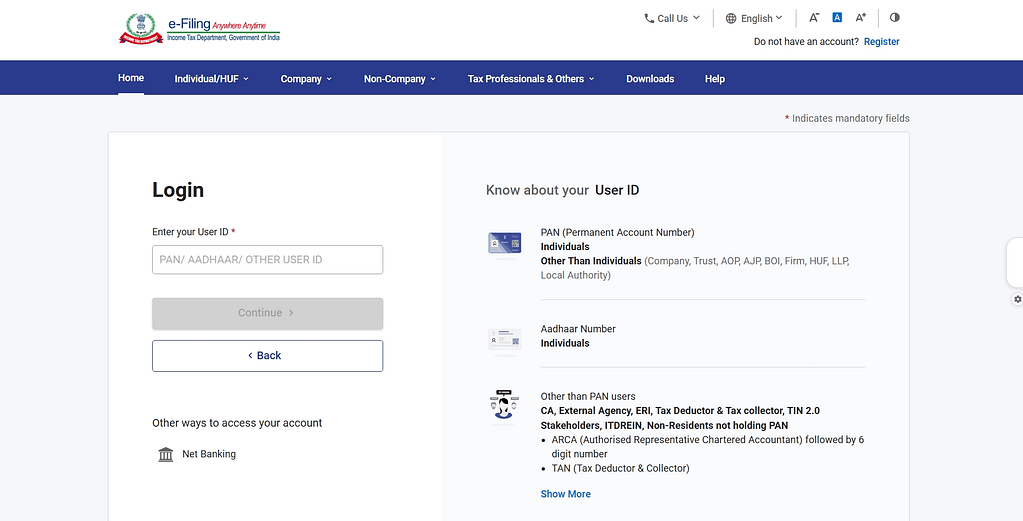
First-time users:
- Go to https://eportal.incometax.gov.in
- Click on “Register” button
- Enter your PAN number
- Fill basic details (name, date of birth, mobile number, email)
- Create a strong password
- Verify mobile number with OTP
- Verify email with OTP
- Registration complete!
Existing users:
- Visit the e-filing portal
- Enter User ID (PAN or Aadhaar)
- Enter password
- Complete OTP verification
- You’re logged in!
Important: Make sure your Aadhaar is linked with PAN. Without this, your ITR will be considered invalid from 2023 onwards.
Step 2: Check Your Form 26AS and AIS
Before filling the ITR form, verify your tax credit statement:
For Form 26AS:
- Go to “Services” menu
- Click “View Form 26AS (Tax Credit)”
- Select Assessment Year 2026-27
- View or download PDF
For AIS (Annual Information Statement):
- Go to “Services” menu
- Click “Annual Information Statement (AIS)”
- Review all financial transactions
- Check TDS credits, interest income, dividend, mutual fund transactions
- If any information is wrong, submit feedback for correction
Match these documents with:
- Your Form 16
- Salary slips
- Investment statements
- Bank interest certificates
Why this step matters: Many ITR rejections happen because of mismatches between what you claim and what’s in Form 26AS/AIS.
Step 3: Select the Right ITR Form and Filing Mode
- On dashboard, click “e-File” → “File Income Tax Return”
- Select “Assessment Year: 2026-27”
- Choose “Mode of Filing: Online”
- Select “ITR Form” (use the table above to choose correctly)
- Click “Continue”
Filing Modes Explained:
- Online filing: Fill form directly on the portal (recommended for beginners – easiest and fastest)
- Offline filing: Download Excel/Java utility, fill offline, then upload JSON file (for tech-savvy users)
For most salaried people, ITR-1 online mode is perfect!
Step 4: Fill Personal and Income Details in the ITR Form
The portal makes this easy with auto-populated data. Here’s what to do:
Section 1: Personal Information
- Name, PAN, Aadhaar (pre-filled, verify accuracy)
- Date of birth
- Contact details (mobile, email)
- Address
- Bank account for refund (select from pre-validated list)
Section 2: Gross Total Income
Click “Import from 26AS/AIS” – this auto-fills:
- Salary income (from Form 16)
- House property income (rent received or notional rent)
- Interest income from savings account, FD
- Other sources (dividend, etc.)
Review each entry carefully. If something looks wrong:
- Cross-check with your Form 16, salary slips, interest certificates
- Manually edit if needed
- Make sure totals match your actual income
Real Example: Amit’s Form 26AS showed ₹8,50,000 salary, but his actual salary was ₹8,75,000 (₹25,000 exempt allowance not appearing in 26AS). He manually corrected it while filling the form.
Step 5: Claim All Your Tax Deductions and Exemptions
This is where you save tax! Don’t miss these:
Section 80C Deductions (up to ₹1.5 lakh):
- Employee Provident Fund (EPF)
- Public Provident Fund (PPF)
- Life Insurance Premium
- ELSS Mutual Funds
- National Savings Certificate (NSC)
- Home loan principal repayment
- Tuition fees for children
- Sukanya Samriddhi Yojana
Section 80D (Health Insurance):
- Premium for self, spouse, children: up to ₹25,000
- Premium for parents: up to ₹25,000 (₹50,000 if parents are senior citizens)
- Preventive health check-up: ₹5,000 (within above limits)
Section 80CCD(1B):
- Additional NPS contribution: up to ₹50,000 (over and above 80C limit)
Section 24(b):
- Home loan interest: up to ₹2 lakh for self-occupied property
HRA Exemption:
- Enter rent paid details
- Landlord’s PAN (if annual rent exceeds ₹1 lakh)
- The portal calculates exempt amount automatically
Section 80E:
- Education loan interest (no upper limit)
Section 80G:
- Donations to eligible charitable institutions
Section 80TTA/80TTB:
- Interest from savings account: ₹10,000 (₹50,000 for senior citizens)
Pro Tip: The portal has built-in calculators for HRA, 80C, and other complex calculations. Use them!
Internal Link: Learn detailed tax-saving strategies for maximum deductions
Step 6: Calculate Tax and Check Refund/Payable Amount
After entering all income and deductions, the portal auto-calculates:
or you can calculate your tax here – Tax Calculator
Tax Computation Shows:
- Gross Total Income
- Less: Total Deductions (80C, 80D, etc.)
- Net Taxable Income
- Tax on taxable income (as per slab rates)
- Less: Rebate under 87A (if applicable – ₹12,500 for income up to ₹5 lakh)
- Add: Cess (4% of tax)
- Total Tax Liability
Then it checks:
- Tax already paid (TDS from Form 16 + 26AS)
- Advance tax paid (if any)
- Self-assessment tax paid (if any)
Final Result:
- Refund Due: If tax paid > tax liability (you get money back! 🎉)
- Tax Payable: If tax paid < tax liability (you need to pay the balance)
If tax is payable:
- Click “Pay Tax” or “Proceed to Payment”
- Select “Challan 280”
- Pay via net banking/debit card/UPI
- Save the payment receipt (BSR Code and challan serial number)
- Return to ITR form and enter payment details in “Taxes Paid” section
Example: Sneha’s total tax liability was ₹45,000. Her employer deducted ₹52,000 as TDS. After filing, she received a refund of ₹7,000 in her bank account!
Step 7: Verify and Submit Your ITR
You’re almost done! Final steps:
Preview Your ITR:
- Click “Preview” button
- Carefully review all sections
- Check for errors, typos, calculation mistakes
- Verify bank account details (refund will come here)
Submit the Return:
- Click “Submit” button
- Confirm submission
- You’ll see acknowledgement number (save this!)
- Download ITR-V (acknowledgement receipt)
E-Verify Your Return (MANDATORY):
Your return is not complete until you verify it! You have 120 days to verify using any of these methods:
Method 1: Aadhaar OTP (Instant – Recommended)
- Click “e-Verify” on confirmation page
- Enter Aadhaar OTP received on registered mobile
- Done! Instant verification
Method 2: EVC via Net Banking
- Login to your bank’s net banking
- Generate EVC code
- Enter code on e-filing portal
Method 3: EVC via Demat Account
- Login to your demat account
- Generate EVC
- Enter on e-filing portal
Method 4: Send Signed ITR-V (Slowest)
- Download ITR-V PDF
- Take printout, sign it
- Send by speed post to: CPC, Income Tax Department, Bengaluru – 560500
- Must reach within 120 days
Why verification is crucial: Without verification, your ITR is considered invalid, and refunds won’t be processed!
Success Confirmation:
- You’ll receive email confirmation: “ITR has been e-verified successfully”
- SMS on registered mobile number
- Check status on portal: “ITR Verified” status should show
Congratulations! Your ITR filing online is complete! 🎊
Common Mistakes to Avoid During ITR Filing Online
Learn from others’ mistakes and save yourself the hassle:
Mistake 1: Not Linking Aadhaar with PAN Your ITR becomes invalid if Aadhaar-PAN linking is not done. Check linking status before filing.
Mistake 2: Choosing Wrong ITR Form Using ITR-1 when you have capital gains leads to rejection. Refer to the form selection guide above.
Mistake 3: Mismatch with Form 26AS Always cross-verify your income and TDS with Form 26AS and AIS before submitting.
Mistake 4: Forgetting to Claim All Deductions Review 80C, 80D, HRA, home loan interest, and other eligible deductions. Missing these means paying more tax unnecessarily.
Mistake 5: Wrong Bank Account Details Refunds get delayed or rejected if bank account is not pre-validated or details are incorrect.
Mistake 6: Not E-Verifying the Return Many people submit ITR but forget to verify within 120 days. This makes the return invalid!
Mistake 7: Filing Last Minute Server crashes, forgotten passwords, document hunts – avoid all this stress by filing early (April-May).
Mistake 8: Not Keeping Supporting Documents Keep all proofs (Form 16, investment receipts, rent receipts) for at least 6 years. Department can ask for verification anytime.
Mistake 9: Ignoring Error Messages If portal shows validation errors, don’t ignore them. Fix all errors before final submission.
Mistake 10: Not Downloading ITR-V Always download and save the ITR-V acknowledgement. This is your proof of filing.
What Happens After ITR Filing Online?
Your journey doesn’t end with submission. Here’s what to expect:
Immediate (Day 0-1):
- Email confirmation of successful filing
- ITR-V acknowledgement download
- Verification (if done via Aadhaar OTP)
Processing Stage (15-45 days):
- Income Tax Department processes your return
- Validates all entries against their database
- Checks for errors, mismatches, or discrepancies
Intimation u/s 143(1) (30-120 days):
- You receive intimation notice via email
- This confirms your return has been processed
- Shows final computed income and tax liability
- May show adjustments made by the department
Possible Outcomes:
✅ Return Accepted As Filed
- No issues found
- Refund (if any) will be processed
⚠️ Return Accepted With Adjustments
- Minor differences found and adjusted
- Refund amount may be different than claimed
- Tax demand may be raised
❌ Return Needs Rectification
- Errors or major discrepancies found
- You need to file revised return or respond to notice
Refund Processing (30-90 days after acceptance):
- Refund amount credited directly to your bank account via NEFT
- Interest is paid if delay exceeds prescribed timelines
- You receive SMS and email notification
How to Track Your Refund Status:
- Login to e-filing portal
- Go to “Services” → “View Returns/Forms”
- Check “Refund Status”
- Or use NSDL TIN website: https://tin.tin.nsdl.com/oltas/refundstatuslogin.html
Average Timeline:
- E-verification: Instant
- Processing: 15-45 days
- Intimation: 30-120 days
- Refund credit: 30-90 days from acceptance
If Refund Delayed:
- Check bank account details on portal
- Ensure account is pre-validated
- File grievance on portal if delay exceeds 90 days
- Contact CPC helpline: 1800-180-1961
Internal Link: Planning your finances better? Check the latest Union Budget updates
ITR Filing Online vs Offline: Which is Better?
Both methods have pros and cons. Let’s compare:
Online ITR Filing (Recommended for most people):
Advantages:
- Auto-population from Form 26AS/AIS saves time
- Built-in validations prevent errors
- Instant calculations
- Immediate submission and acknowledgement
- E-verification via Aadhaar OTP (instant)
- No need to download utilities or software
- Works on any device (laptop, tablet, mobile)
Disadvantages:
- Requires stable internet connection
- Server issues during peak times (July deadline)
- Session timeout if you take too long
Offline ITR Filing (For tech-savvy users):
Advantages:
- Fill form at your own pace without internet
- No session timeouts
- Can save and work in multiple sessions
- Useful for complex returns with extensive data
Disadvantages:
- Need to download Excel/Java utility
- Manual data entry (no auto-population)
- Generate JSON file and upload
- More technical knowledge required
- Higher chance of errors
My Recommendation: If you’re filing ITR filing online for the first time or have a straightforward salary income return, go with online mode. It’s faster, easier, and less error-prone.
Revised ITR: What If You Made a Mistake?
Don’t panic if you discovered an error after filing! You can file a revised return.
When to File Revised ITR:
- Forgot to claim a deduction (80C, 80D, HRA)
- Entered wrong income amount
- Missed reporting income from other sources
- Bank account details were wrong
- Claimed wrong form (filed ITR-1 instead of ITR-2)
- Any other genuine mistake
Time Limit for Revised Return:
You can revise your return before the earlier of:
- 3 months before the end of relevant assessment year, OR
- Before completion of assessment
Practically: You usually have time till December 31st of the assessment year to revise.
How to File Revised ITR Online:
- Login to e-filing portal
- Go to “File Returns” → “Income Tax Return”
- Select “Type of Return: Revised u/s 139(5)”
- Enter original return acknowledgement number
- Make necessary corrections
- Submit and verify again
Important Points:
- You can file multiple revised returns if needed
- Latest filed revised return is treated as final
- Can’t revise to reduce income or increase refund if it raises suspicion
Example: Rajesh filed ITR in July 2026 but forgot to claim ₹50,000 NPS deduction under 80CCD(1B). In September, he filed a revised return including this deduction and got ₹15,000 additional refund!
ITR Filing Online Using Mobile App
Yes, you can file your return directly from your smartphone!
Official App: “Income Tax India e-Filing”
Available on:
- Google Play Store (Android)
- Apple App Store (iOS)
Features:
- File ITR-1 and ITR-4
- Check refund status
- View Form 26AS
- Download ITR-V
- E-verify returns
- Track processing status
- Access AIS
How to Use:
- Download app from your app store
- Login with PAN and password
- Complete OTP verification
- Select “File ITR”
- Follow on-screen instructions (similar to website)
- Submit and e-verify
Limitations:
- Only ITR-1 and ITR-4 available on mobile app
- ITR-2 and ITR-3 still need desktop/laptop
- Small screen can make data entry challenging
- Complex forms better done on larger screens
My Take: Mobile app is great for simple salary returns and checking status. For detailed filing with multiple income sources, use a laptop/desktop for better visibility and easier data entry.
Helpful Tips for Smooth ITR Filing Online
Based on real experiences, here are some golden tips:
Before Filing:
✅ File Early: Don’t wait for July 31st. April-May is the best time – no server rush, enough time to fix errors
✅ Organize Documents: Create a folder (physical or digital) with all necessary documents before starting
✅ Pre-validate Bank Account: Do this in March/April to ensure refunds come smoothly
✅ Check Aadhaar-PAN Linking: Verify linking status well in advance
✅ Download Form 16: Ask your employer early (usually available by May end)
During Filing:
✅ Use Auto-Fill: Import data from Form 26AS/AIS – saves time and reduces errors
✅ Double-Check TDS: Match TDS amounts with Form 16 and 26AS exactly
✅ Claim All Eligible Deductions: Review the entire deduction list – don’t leave money on the table
✅ Save Draft Frequently: Online forms have timeout – save progress every 10-15 minutes
✅ Preview Before Submit: One final careful review can catch silly mistakes
After Filing:
✅ E-Verify Immediately: Don’t wait for 120 days. Use Aadhaar OTP right after submission
✅ Download ITR-V: Save PDF in multiple locations (email, cloud, hard drive)
✅ Note Down Acknowledgement Number: Keep it safe for future reference
✅ Track Processing: Check status after 2-3 weeks
✅ Keep Documents Safe: Store all supporting documents for 6 years minimum
Internal Link: Stay updated on financial news that affects your taxes
Free vs Paid ITR Filing: Should You Use Third-Party Platforms?
You have two routes for ITR filing online:
Route 1: Direct Government Portal (100% Free)
Advantages:
- Completely free
- Official and secure
- All ITR forms available
- Direct submission to Income Tax Department
- No middleman
Best for:
- Simple salary returns
- People comfortable with online forms
- Those who’ve filed before
Route 2: Third-Party Platforms (Free or Paid)
Popular platforms: ClearTax, QuickBooks, TaxBuddy, myITreturn, etc.
Free Plans (Usually cover ITR-1/4):
- Simplified interface
- Guided step-by-step process
- Automatic calculations
- PDF download of filled return
- Basic support
Paid Plans (₹500-₹2,500+):
- All ITR forms (including complex ITR-2, ITR-3)
- CA assistance
- Unlimited revisions
- Priority support
- Tax planning advice
- Previous year returns
- Capital gains calculations
Best for:
- First-time filers wanting hand-holding
- Complex cases (capital gains, business income)
- People who want CA review
- Those who value time over money
My Honest Opinion:
If you’re a salaried person with:
- Income from salary only
- Basic 80C, 80D deductions
- One house property
- No capital gains
→ Use the free government portal. It’s simple enough, and you’ll save ₹500-₹1,000.
If you have:
- Multiple income sources
- Sold property or stocks (capital gains)
- Business/professional income
- Foreign income
- Complex tax situations
→ Consider paid platforms or CA services. The ₹1,000-₹2,000 you pay can save you from costly mistakes and potential tax notices.
Tax Slabs for 2026: Know Your Tax Liability
Before filing, understand which tax regime applies to you and your tax liability:
New Tax Regime (Default from FY 2023-24)
Tax Slabs for FY 2025-26:
- Up to ₹3 lakh: Nil
- ₹3 – ₹7 lakh: 5%
- ₹7 – ₹10 lakh: 10%
- ₹10 – ₹12 lakh: 15%
- ₹12 – ₹15 lakh: 20%
- Above ₹15 lakh: 30%
Standard Deduction: ₹75,000 (for salaried individuals)
Deductions NOT available: 80C, 80D, HRA, etc. (except employer NPS, standard deduction)
Old Tax Regime (Optional)
Tax Slabs:
- Up to ₹2.5 lakh: Nil
- ₹2.5 – ₹5 lakh: 5%
- ₹5 – ₹10 lakh: 20%
- Above ₹10 lakh: 30%
Standard Deduction: ₹50,000
All deductions available: 80C (₹1.5 lakh), 80D, 80CCD(1B) (₹50,000), HRA, home loan interest, etc.
Which Regime to Choose?
Calculate tax under both regimes and choose the one with lower liability. Generally:
- New regime better if: You have minimal investments/deductions
- Old regime better if: You max out 80C, 80D, HRA, home loan deductions
You can switch between regimes every year (if you have business income, some restrictions apply).
Internal Link: Economic factors affecting your tax planning
Frequently Asked Questions (FAQs)
Q1: What is the last date for ITR filing online for FY 2025-26?
The deadline for ITR filing online for FY 2025-26 (Assessment Year 2026-27) is July 31, 2026 for individuals. If you miss this date, you can file a belated return by December 31, 2026, but you’ll have to pay a late fee of ₹5,000 (₹1,000 if your income is below ₹5 lakh). Filing on time saves you from penalties and allows you to carry forward losses if any. Set a reminder for June to avoid last-minute rush!
Q2: Can I file ITR online without Form 16?
Yes, you can! Form 16 is helpful but not mandatory for ITR filing online. If your employer hasn’t provided Form 16, you can use Form 26AS (available on e-filing portal) which shows all TDS deducted on your PAN. Login to the portal, download Form 26AS, and use those details to fill your ITR. However, Form 16 provides a detailed salary breakup which makes filing easier. If your employer is delaying, remind them – they’re legally required to provide it by June 15.
Q3: How long does it take to receive income tax refund after filing ITR?
After successful ITR filing online and e-verification, processing typically takes 15-45 days. Once your ITR is processed and accepted, refunds are usually credited within 30-60 days. In total, expect your refund in 2-4 months from filing date. However, peak season filings (July) may take longer due to high volume. You can track refund status on the e-filing portal under “Refund Status” or on NSDL TIN website. Ensure your bank account is pre-validated for faster refunds!
Q4: Is Aadhaar mandatory for ITR filing online?
Yes, linking Aadhaar with PAN is mandatory for ITR filing online since 2019. Without Aadhaar-PAN linking, your ITR will be considered invalid. To check linking status, visit incometaxindia.gov.in and go to “Link Aadhaar” section. If not linked, you can link it instantly using your Aadhaar number and mobile OTP. Only exemptions are for residents of Assam, Jammu & Kashmir, and Meghalaya, and NRIs who don’t have Aadhaar. For everyone else, Aadhaar linking is compulsory.
Q5: Can I file revised ITR if I made a mistake in original return?
Yes! If you discover any error after filing, you can submit a revised return under Section 139(5). You can revise your ITR anytime before 3 months from the end of the assessment year or before assessment completion, whichever is earlier. Practically, you have time till around December 31st of the assessment year. Login to the portal, select “Revised Return u/s 139(5)”, enter your original acknowledgement number, make corrections, and resubmit. You can revise multiple times if needed – the latest filed return is considered final.
Q6: Should I choose old tax regime or new tax regime in 2026?
It depends on your investments and deductions! For ITR filing online, you need to decide which regime benefits you more. Choose New Tax Regime if you have minimal investments and want higher tax exemption limit (up to ₹3 lakh tax-free). Choose Old Tax Regime if you maximize deductions like 80C (₹1.5 lakh), 80D, HRA, home loan interest, etc. Use the tax calculator on the e-filing portal or third-party websites to compare both regimes. Most salaried employees with good investments benefit from the old regime. You can switch between regimes every year.
Filing your ITR might have seemed scary at first, but now you know it’s totally manageable! With this step-by-step guide to ITR filing online, you can confidently complete your tax return without any CA help.
Remember the key points: gather all documents first, choose the correct ITR form, verify Form 26AS, claim all eligible deductions, double-check before submission, and e-verify immediately. File early (April-May) to avoid the July rush and server crashes.
ITR filing online isn’t just about legal compliance – it’s about claiming your rightful refunds, building financial credibility, and maintaining a clean tax record. Whether you’re applying for loans, planning foreign travel, or growing your business, those ITR documents will come in handy.
So don’t procrastinate! Block 1-2 hours this weekend, follow this guide, and get your ITR done. You’ll feel so relieved once that acknowledgement number is in your hand!
Have questions or got stuck somewhere? Drop a comment below, and I’ll help you out. Happy filing! 🎯
Important Source Suggestions (DoFollow):
- https://eportal.incometax.gov.in (official e-filing portal)
- https://www.incometax.gov.in (Income Tax Department main site)
- https://tin.tin.nsdl.com (for refund status tracking)
- https://www.incometax.gov.in/iec/foportal/help/how-to-file-itr (official ITR filing help)
- https://www.incometax.gov.in/iec/foportal/help/individual (individual taxpayer guidelines)
⚠️ COMPLIANCE CHECK
Disclaimer Line: “This article provides general information about ITR filing process for educational purposes. Tax laws and filing procedures are subject to change. For complex tax situations or specific advice, please consult a qualified Chartered Accountant or tax professional.”
AdSense Safety Note: Content is purely educational about the income tax return filing process using official government portal; contains no misleading claims, affiliate promotions, or financial advice that could violate AdSense policies. All information is based on current Income Tax Act provisions and official government guidelines.